Open Responses
Overview
Open WebUI has experimental support for Open Responses, an open specification for multi-provider, interoperable LLM interfaces. This guide walks you through enabling the Open Responses API for a connection.
This feature is currently experimental and may not work as expected with all providers.
What is Open Responses?
Open Responses is an open-source specification that standardizes how LLM requests and responses are structured across providers. It provides:
- One spec, many providers: Describe inputs/outputs once; run on OpenAI, Anthropic, Gemini, or local models.
- Composable agentic loops: Unified streaming, tool invocation, and message orchestration.
- Easier evaluation and routing: Compare providers, route requests, and log results through a shared schema.
Open Responses builds on the OpenAI Responses API format but is designed to work across any provider that implements the spec.
Step 1: Add or Edit a Connection
- Go to Settings > Admin > Connections and find the Manage OpenAI API Connections list.
- Click ➕ Add Connection to create one, or click Configure (the gear icon) on an existing connection to edit it.
Step 2: Select the API Type
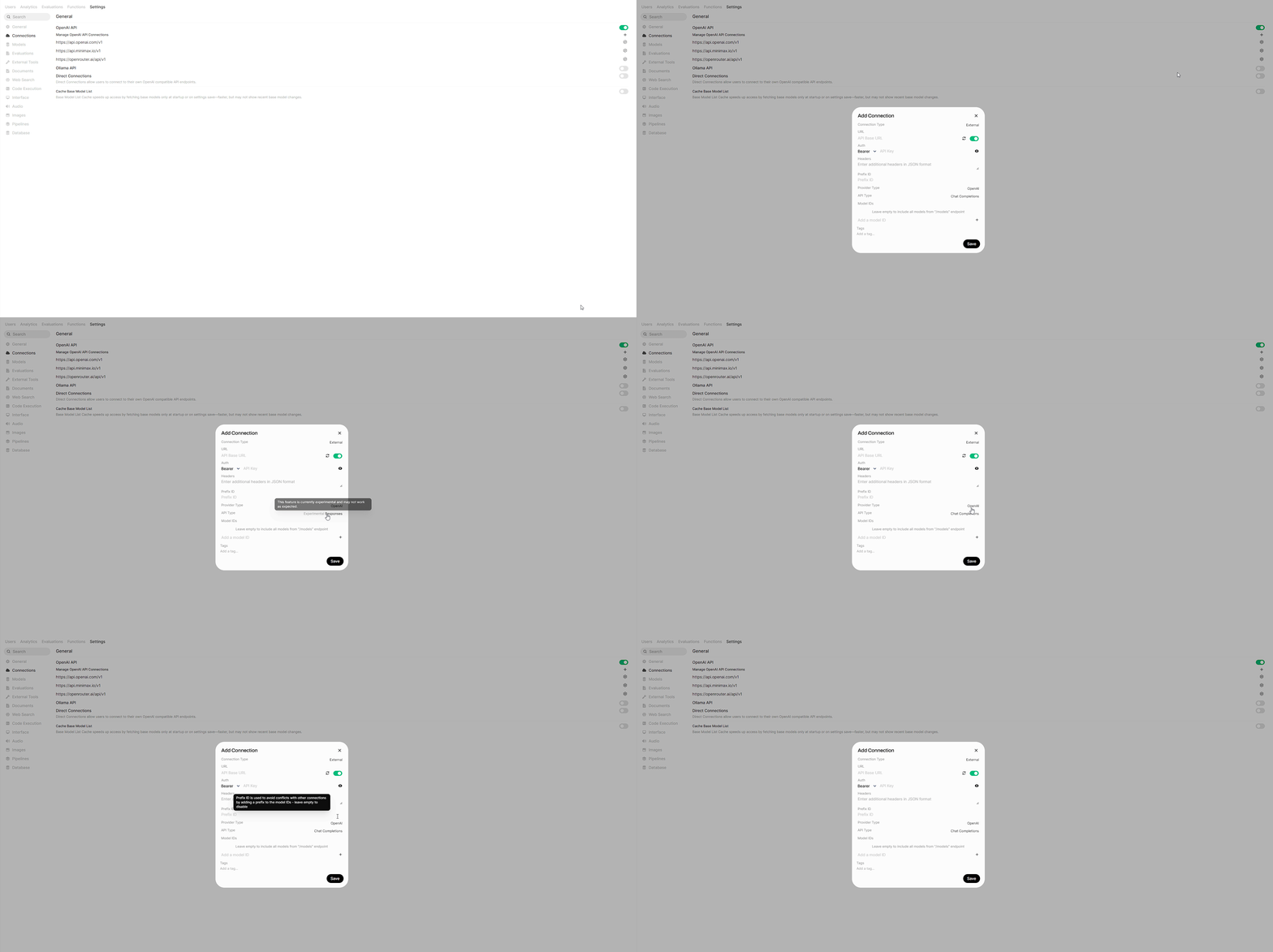
In the connection modal, look for the API Type setting:
- Chat Completions (default): Uses the standard OpenAI Chat Completions API format.
- Responses: Uses the Open Responses API format.
Click the toggle to switch to Responses.
Step 3: Configure Your Provider
Enter the connection details for a provider that supports the Open Responses format:
- URL: Your provider's API endpoint
- API Key: Your authentication credentials
- Model IDs: (Optional) Specify specific models to use
Step 4 (Optional): Enable Native Server-Side Tools
Some providers, most notably OpenAI, expose server-side tools through the Responses API. The headline example is native web search: the model runs the search itself, then returns a grounded answer with source citations. Open WebUI forwards these tools to the provider and renders their results natively, so nothing else needs to be wired up.
Native server-side tools run entirely on the provider's side and only work on API Type: Responses connections (Steps 1 to 2 above). They are independent of Open WebUI's own Web Search providers (Tavily, SearXNG, etc.), you don't need to configure or enable those. Leave the model's Web Search capability off; the native tool replaces it, and enabling both is redundant.
To turn on native web search for a model:
- Go to Workspace → Models and edit (✏️) a model that uses your Responses connection.
- Expand Advanced Params.
- At the bottom, click ➕ Add Custom Parameter and set:
- Name:
tools - Value:
[{"type": "web_search"}]
- Name:
- Save the model.
When you chat with that model, the provider performs web searches server-side, and Open WebUI streams:
- A "Web Search" status block showing the queries the model ran.
- Clickable source citations drawn from the results.
- The model's grounded answer.
The tools custom parameter accepts any tool your provider supports in the Responses API. Pass several by adding them to the array:
[{"type": "web_search"}, {"type": "code_interpreter"}]You can also include provider-specific options on a tool object (for web search, e.g. search_context_size or user_location). See your provider's Responses API documentation. Older OpenAI model snapshots may require {"type": "web_search_preview"} instead of web_search.
The Add Custom Parameter button is shown to administrators in the model editor. Custom parameters are forwarded to the provider as-is, so only use valid Responses API tool definitions.
The same button exists under Model Defaults in Settings > Admin > Models, which applies to every model. Custom parameters from the two places are combined name by name, so adding tools here keeps the instance-wide ones the model does not name. Use the same name in both places and the model's value is the one sent. See Global Model Defaults.
Supported Providers
Open Responses is a new specification, so provider support is still growing. Check the Open Responses website for the latest list of compliant providers and implementations.
Troubleshooting
Connection works with Chat Completions but not Responses
Not all providers support the Open Responses format yet. Try:
- Switching back to Chat Completions
- Checking if your provider explicitly supports Open Responses
- Using a middleware proxy that can translate to Open Responses format
Streaming or tool calls behave unexpectedly
Tool calls, re-invocations, and streaming are supported for Responses API connections. Open WebUI transparently converts between Chat Completions and Responses API formats, including tool call arguments, function call outputs, and multi-turn tool use. If you still encounter issues:
- Check the Open WebUI Discord for known issues
- Report bugs on GitHub
Providers that deviate from the Responses format
Not every endpoint that advertises the Responses format emits it exactly, and Open WebUI absorbs the common deviations rather than losing the reply over them. A stream that closes reporting no content keeps whatever was already streamed. A fragment arriving before the item it belongs to is skipped without truncating the rest of the answer. A provider that hands over its finished message only at the very end has that message applied, so the reply and its citations are stored and carry into the next turn.
Open WebUI cannot recover content the provider never sent. If replies are consistently short or empty, compare the same prompt against the provider's own API before reporting it here.
Stateful sessions
By default, Open WebUI treats Responses API connections as stateless: it manages conversation history locally and sends the full context with each request. If your upstream provider supports stateful sessions (server-side response storage with previous_response_id anchoring, e.g., direct OpenAI connections), you can enable ENABLE_RESPONSES_API_STATEFUL=true to let the provider manage conversation state.
Most proxies and third-party Responses API endpoints are stateless and will break if stateful mode is enabled. Only use this with providers that explicitly support stateful Responses API sessions.
Learn More
- Open Responses Specification: Full technical specification
- Open Responses GitHub: Source code and discussions
- FAQ: Why doesn't Open WebUI natively support proprietary APIs?: Learn about our protocol-first philosophy