Translations
Open WebUI translates its own interface into many languages, but the things you create in it, model names, tool descriptions, banner text, are stored as whatever you typed. Translations let you store a version of that text per language, so a user reading the interface in German sees a German model name and German prompt suggestions while everyone else keeps the original.
Nothing is translated automatically. You write each version yourself, or import a file someone else prepared.
Separately from that, admins can override Open WebUI's own interface wording, the buttons and labels the application ships with. That is Interface text at the bottom of this page.
What can be translated
| Resource | Fields | Where |
|---|---|---|
| Models | Name, description, prompt suggestions, model control and option names | Workspace > Models, in the model editor. See Models |
| Tools | Name, description, valve labels | Workspace > Tools, in the tool editor |
| Skills | Name, description | Workspace > Skills, in the skill editor |
| Functions | Name, description, valve labels, per-action labels | Admin Panel > Functions, in the function editor |
| Banners | Content, not the title | Settings > Admin > General, next to the Banners heading |
| Arena models | Name, description | Settings > Admin > Evaluations, in the arena model dialog |
| Default prompt suggestions | The suggestions themselves | Settings > Admin > Models > Model Defaults |
| Open WebUI's own interface | Any string the application ships | Settings > Admin > General, under UI Translations. See Interface text |
The language selector
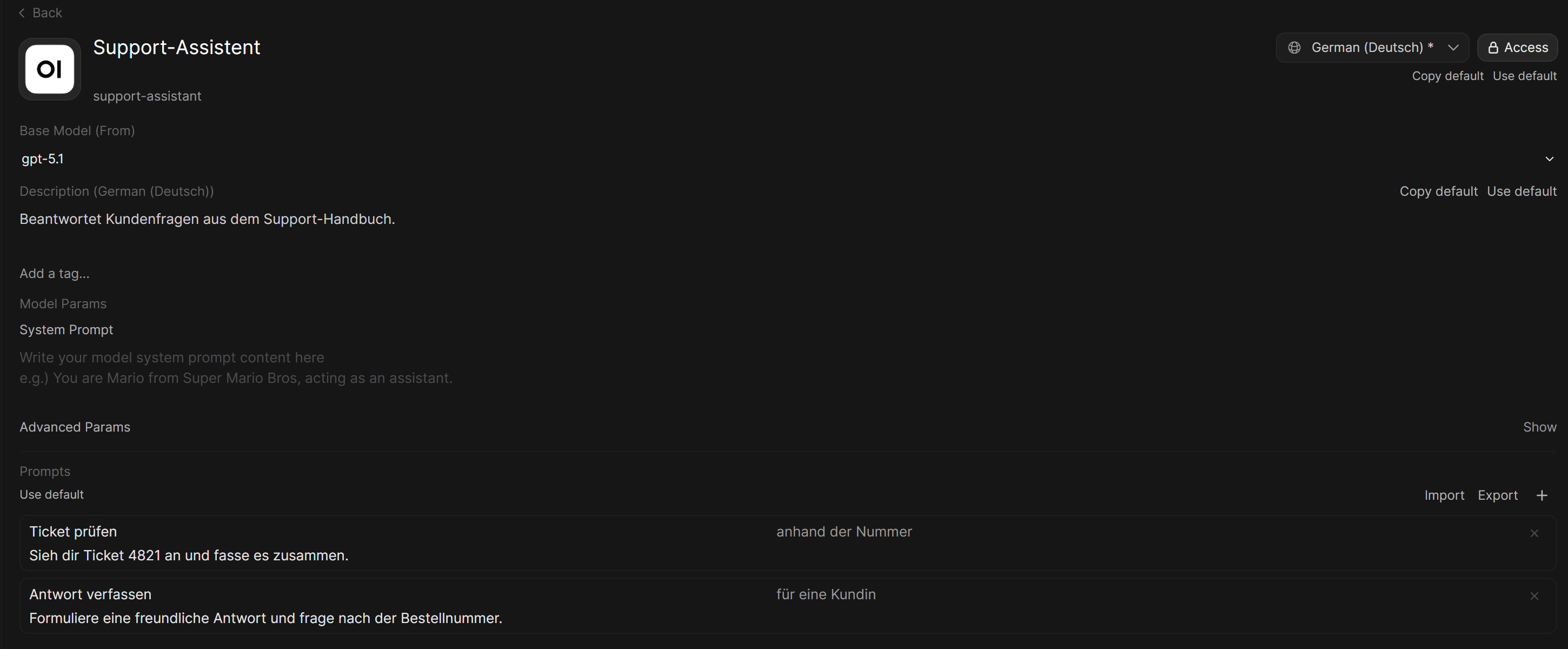
Every editor that supports this has a globe selector. It starts on Default, which is the original text, and picking a language switches the editor over to that language: the fields now hold the translated text and show the original as placeholder text. Switch back to Default to edit the original again.
Every language Open WebUI ships is offered, English included. Default is not a language, it is the original text, and that is what the plain fields hold. Picking en-US stores an English translation that English readers see instead of the original, which is usually not what you want: leave English on Default unless you deliberately want a separate wording for it.
In the resource editors, a language that already carries text is marked with *, so you can see at a glance what has been translated.
In the model editor, the banner list and the arena dialog, a translated field carries two small buttons: Copy default drops the original in as a starting point, and Use default clears the translation so the original is used again. Tool and skill names and descriptions have no buttons, just type in the field, and empty it again to go back to the original.
Which version a user sees
Open WebUI picks by the language the user has the interface set to, in this order:
- The exact language, for example
de-DE - The base language,
de, so adetranslation coversde-DEandde-AT - The original text
A field you leave blank is dropped when you save, so an empty translation is the same as no translation and the original shows through. Translate what matters and leave the rest.
Translated text follows the resource everywhere it is named: model and tool pickers, the new chat screen, the @, $ and / menus, the Integrations menu, the model controls panel, the action buttons under a reply, the sidebar and the Workspace lists. Workspace search matches both the translated name and the original, so searching for either finds the thing.
Translating valve labels
Tools and functions carry valves, the settings an admin or a user fills in. Their labels can be translated too, which matters most for user valves, since those are the ones ordinary users see in Chat Controls.
Pick a language in a tool or function editor and the code editor is replaced by a translation table listing every label the plugin exposes, both admin valves and user valves. Each row shows the key, the original text and a box for your version, with an arrow button to clear that row back to the original.
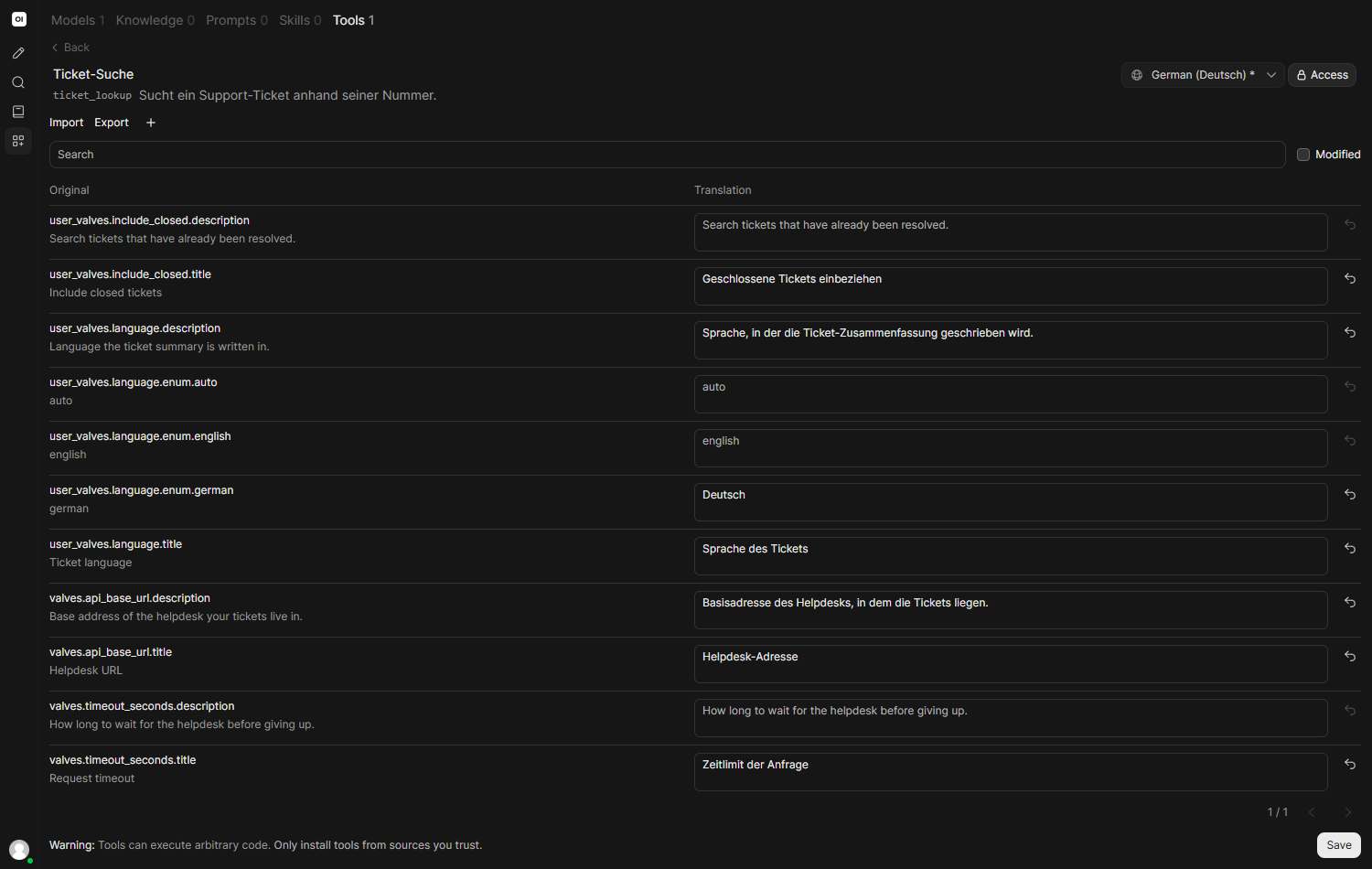
Keys follow the shape of the valve they belong to:
| Key | What it labels |
|---|---|
valves.<field>.title | The label of an admin valve |
valves.<field>.description | Its help text |
valves.<field>.enum.<value> | One option of a dropdown valve |
user_valves.<field>. | The same three shapes again, for a user valve |
actions.<action_id>.name | The label of one action a function exposes |
actions.<action_id>.description | That action's tooltip |
Action keys are not listed automatically. Add them with the + button, which takes a key of your own.
Only the labels change. Valve names, stored values and defaults are untouched, so a translated plugin behaves exactly like an untranslated one.
Importing and exporting
Export downloads the current language as a JSON file of key and text pairs, named after the plugin and the language, and skips anything you left blank. Import reads that file back, which is the practical way to hand a file to a translator or to copy a set of translations to another instance.
An import is checked before it is accepted. Every value has to be a string, and any {{ placeholder }} in the original has to appear in the translation as well, so a translation cannot quietly drop the value that gets substituted into it. A file that fails either check is rejected with the offending key named, and nothing is changed.
The table also has a search box and a Modified filter for showing only rows you have actually translated, which is how you find what is left in a plugin with a lot of valves.
Translating model controls
A model's controls carry names people read in the chat: the control's name, its description and the name of each option. Pick a language in the model editor and the Model controls row lists each of them with the original as placeholder text. Use default clears every control translation for that language at once.
The translations are stored with the model's other translations in meta.i18n, one map per language, under these keys:
| Key | What it labels |
|---|---|
model_controls.<key>.label | The control's name |
model_controls.<key>.description | Its help text |
model_controls.<key>.options.<value>.label | The name of one option |
<key> is the control's ID and <value> the option's ID, the same IDs the API uses under params.model_controls. Only the names change; the parameters each option sends stay the same in every language.
Banners
Banner content is translated from Settings > Admin > General, with the same globe selector next to the Banners heading. Each banner keeps its original content and a version per language, and a user is shown the one matching their interface language.

This replaces the older habit of putting several languages into one banner. Writing them as translations means each user reads one message in their own language instead of a stack of them. See Banners.
Interface text
Everything above is about the things you create. This one is about Open WebUI's own wording: the buttons, labels and messages the application ships with.
Open Settings > Admin > General and find UI Translations. Each row is a pair: on the left the original English string exactly as the application uses it, on the right what you want shown instead. The selector picks which language the right-hand column belongs to, and it starts on the language you are currently reading the interface in.
The overrides are merged over the language files Open WebUI ships. Anything you override wins, everything you leave alone keeps the shipped wording, so you never have to supply a whole catalogue to change one word.

The result, on the interface itself:
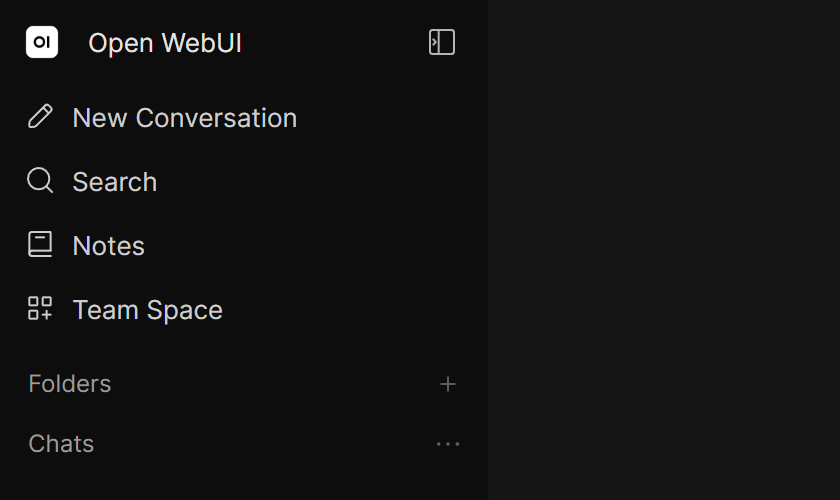
This part does not fall back the way resource translations do. An override stored under en-US does nothing for someone reading the interface in en-GB, and one stored under de does nothing for de-DE. Store the override under every language code your users actually run, or the change silently does not appear.
English counts as a language here, which makes this the way to rename things for everyone: put Knowledge on the left, Library on the right, save it under English, and the whole interface says Library.
The left-hand side has to match the original string exactly, including capitals and punctuation. It is the key the application looks up, so a near miss simply never matches and nothing changes.
A few rules are enforced when you save, and a save that breaks one is refused with the offending entry named:
- The replacement has to be text. A blank one is dropped, which is how you remove an override.
- Any
{{ placeholder }}in the original has to appear in the replacement too, so a rewritten string cannot lose the value that gets substituted into it. - The same original text cannot appear in two rows.
__proto__,prototypeandconstructorare refused as a language or an original string.
Delete on a row removes only the replacement for the language picked in the selector, and its tooltip names that language. Replacements in other languages stay, and the row disappears once none is left.
Your own session updates the moment you save. Everyone else picks the change up the next time their browser loads Open WebUI.
Setting it through the API
The overrides live in the admin config as I18N, a map of language to a map of original string to replacement, sent to POST /api/v1/auths/admin/config and readable from /api/config as i18n. The same rules are enforced there.
Leaving I18N out of the request keeps whatever is stored, so an integration that writes other admin settings will not wipe the overrides by accident. Sending {} clears them.
Notes
- Translations are stored with the resource itself, so exporting a model, tool or skill carries them along.
- A user with the interface in a language you have not translated sees the original text, never a blank field.
- Nothing here changes what the model receives. A model still gets the original system prompt, the original valve values and the original tool specification, so translating a description does not change how anything behaves.