Filters
Filters
Pipelines are outdated and legacy, and are no longer recommended. A Pipeline can run as a pipe or as a filter; both forms now have in-process replacements that are built in, easier to configure, and need no separate worker container:
- Pipeline pipe (custom provider, RAG, request routing) → Pipe Function
- Pipeline filter (message pre/post-processing) → Filter Function
This page is kept for reference and existing deployments only.
Filters are used to perform actions against incoming user messages and outgoing assistant (LLM) messages. Potential actions that can be taken in a filter include sending messages to monitoring platforms (such as Langfuse or DataDog), modifying message contents, blocking toxic messages, translating messages to another language, or rate limiting messages from certain users. A list of examples is maintained in the Pipelines repo. Filters can be executed as a Function or on a Pipelines server. The general workflow can be seen in the image below.
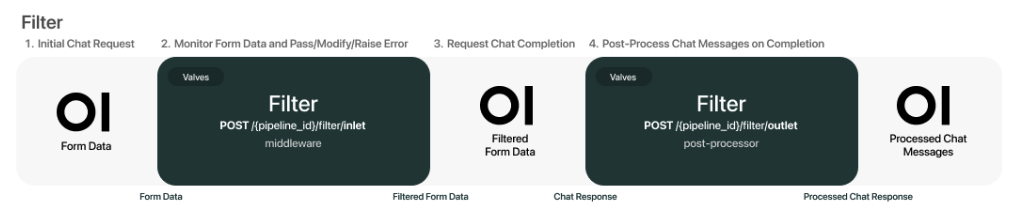
When a filter pipeline is enabled on a model or pipe, the incoming message from the user (or "inlet") is passed to the filter for processing. The filter performs the desired action against the message before requesting the chat completion from the LLM model. Finally, the filter performs post-processing on the outgoing LLM message (or "outlet") before it is sent to the user.