Pipes
Pipes
Pipelines are outdated and legacy, and are no longer recommended. A Pipeline can run as a pipe or as a filter; both forms now have in-process replacements that are built in, easier to configure, and need no separate worker container:
- Pipeline pipe (custom provider, RAG, request routing) → Pipe Function
- Pipeline filter (message pre/post-processing) → Filter Function
This page is kept for reference and existing deployments only.
Pipes are standalone functions that process inputs and generate responses, possibly by invoking one or more LLMs or external services before returning results to the user. Examples of potential actions you can take with Pipes are Retrieval Augmented Generation (RAG), sending requests to non-OpenAI LLM providers (such as Anthropic, Azure OpenAI, or Google), or executing functions right in your web UI. Pipes can be hosted as a Function or on a Pipelines server. A list of examples is maintained in the Pipelines repo. The general workflow can be seen in the image below.

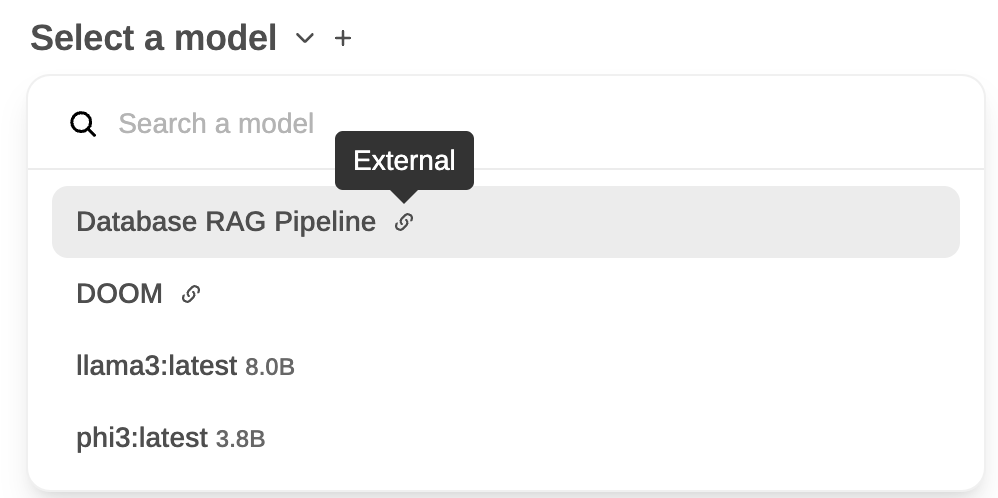
Pipes that are defined in your WebUI show up as a new model with an "External" designation attached to them. An example of two Pipe models, Database RAG Pipeline and DOOM, can be seen below next to two self-hosted models:
Streaming response format
Pipes can return either a single str or an iterator/generator. When streaming, each yielded item can be:
-
A plain string: treated as assistant-visible text content and appended to the message as it arrives. This is the simplest form and the one most agent pipelines should use for regular output.
-
An OpenAI-compatible SSE chunk dict: same shape as the
/v1/chat/completionsstreaming response, i.e.{"choices": [{"delta": {"content": "..."}, "finish_reason": None}]}Use this when you need to set fields other than
content(for examplefinish_reasonon the final chunk).
For a self-contained stream, close it with a single terminating chunk:
yield {"choices": [{"delta": {}, "finish_reason": "stop"}]}finish_reason should appear exactly once, at the end, and for a pipeline that handles its own tool execution it should always be "stop", not "tool_calls" (see the next section).
Self-contained agents and delta.tool_calls
This is the single biggest gotcha when building an agent pipeline (LangChain, LlamaIndex, a custom planner, anything that executes its own tools and streams the result back).
delta.tool_calls in a chunk means "please execute this tool call for me, client". When Open WebUI's middleware sees it, the tool executor picks up the call, runs it, appends a role: "tool" message, and fires a continuation request back at the same pipeline. It does this in a loop capped by CHAT_RESPONSE_MAX_TOOL_CALL_ITERATIONS (default 256; CHAT_RESPONSE_MAX_TOOL_CALL_RETRIES, default 30, on versions before v0.9.6).
If your pipeline already executed the tool internally, emitting delta.tool_calls makes Open WebUI try to execute it again, and since the pipeline keeps emitting the same call on every retry, you get 30 copies of the response stacked on top of each other before the retry cap trips. Same thing happens if you set finish_reason: "tool_calls" mid-stream.
Rule of thumb:
- The model is calling a tool Open WebUI should run → emit
delta.tool_calls, terminate withfinish_reason: "tool_calls", let the middleware call the tool and re-enter your pipeline. - The pipeline is running an agent that owns its own tools → do not emit
delta.tool_callsat all. Render the tool execution as content using the<details type="tool_calls">block described below.
Rendering tool execution as content
Open WebUI's own server-side tool path renders finished tool executions as <details type="tool_calls"> blocks in the message content. You can emit the same block from an agent pipeline to get the identical "Called <tool>" chip with an expandable arguments + result view:
import html
import json

call_id = "call_123"
name = "get_weather_test"
arguments = {"location": "SF"}
result = {"temp_c": 22}

details_block = (
    f'<details type="tool_calls" done="true" '
    f'id="{call_id}" name="{name}" '
    f'arguments="{html.escape(json.dumps(arguments))}">\n'
    f'<summary>Tool Executed</summary>\n'
    f'{html.escape(json.dumps(result, ensure_ascii=False))}\n'
    f'</details>\n'
)
Yield details_block as content, either directly as a string (simplest on a Pipelines server) or inside a delta.content chunk:
# Simplest — works on Pipelines servers:
yield details_block

# Or as an explicit OpenAI chunk:
yield {"choices": [{"delta": {"content": details_block}, "finish_reason": None}]}
The final stream for a self-contained agent that ran one tool looks like this end-to-end:
def pipe(self, user_message, model_id, messages, body):
    # 1. Pre-tool narrative
    yield {"choices": [{"delta": {"role": "assistant", "content": "Looking up the weather… "}, "finish_reason": None}]}

    # 2. Agent runs the tool internally (not shown)
    call_id = "call_123"
    name = "get_weather_test"
    arguments = {"location": "SF"}
    result = {"temp_c": 22}

    # 3. Render the execution as a <details> block — NOT delta.tool_calls
    details_block = (
        f'<details type="tool_calls" done="true" '
        f'id="{call_id}" name="{name}" '
        f'arguments="{html.escape(json.dumps(arguments))}">\n'
        f'<summary>Tool Executed</summary>\n'
        f'{html.escape(json.dumps(result, ensure_ascii=False))}\n'
        f'</details>\n'
    )
    yield details_block

    # 4. Post-tool narrative
    yield "The weather is 22°C. Done."

    # 5. Single terminating chunk
    yield {"choices": [{"delta": {}, "finish_reason": "stop"}]}
LangChain agent example
Wiring a LangChain agent into this pattern, drop tool_calls on AIMessageChunk, render ToolMessage as a <details> block:
import html
import json

for chunk in agent.stream({"messages": messages}, stream_mode=["updates", "messages"]):
    if chunk["type"] != "messages":
        continue
    message = chunk["data"][0]

    if isinstance(message, AIMessageChunk):
        # Stream content only — drop message.tool_calls entirely.
        if message.content:
            yield message.content

    elif isinstance(message, ToolMessage):
        args = getattr(message, "args", {}) or {}
        details = (
            f'<details type="tool_calls" done="true" '
            f'id="{message.tool_call_id}" name="{message.name}" '
            f'arguments="{html.escape(json.dumps(args))}">\n'
            f'<summary>Tool Executed</summary>\n'
            f'{html.escape(json.dumps(message.content, ensure_ascii=False, default=str))}\n'
            f'</details>\n'
        )
        yield details

# Single terminating chunk
yield {"choices": [{"delta": {}, "finish_reason": "stop"}]}
Reference discussion: open-webui #23957 walks through the duplication symptom and the fix in detail.