Action Function: Custom Interactive Buttons
Action Functions execute arbitrary Python code on your server. Function creation is restricted to administrators only. Only install from trusted sources and review code before importing. A malicious Function could access your file system, exfiltrate data, or compromise your entire system. For full details, see the Plugin Security Warning.
Action functions allow you to write custom buttons that appear in the message toolbar for end users to interact with. This feature enables more interactive messaging, allowing users to grant permission before a task is performed, generate visualizations of structured data, download an audio snippet of chats, and many other use cases.
Action functions should always be defined as async. The backend is progressively moving toward fully async execution, and synchronous functions may block execution or cause issues in future releases.
Actions are admin-managed functions that extend the chat interface with custom interactive capabilities. When a message is generated by a model that has actions configured, these actions appear as clickable buttons in the toolbar beneath the message, next to copy and regenerate.
A minimal scaffold is shown in the Function Structure section below. For real-world Action examples built by the community, browse openwebui.com.
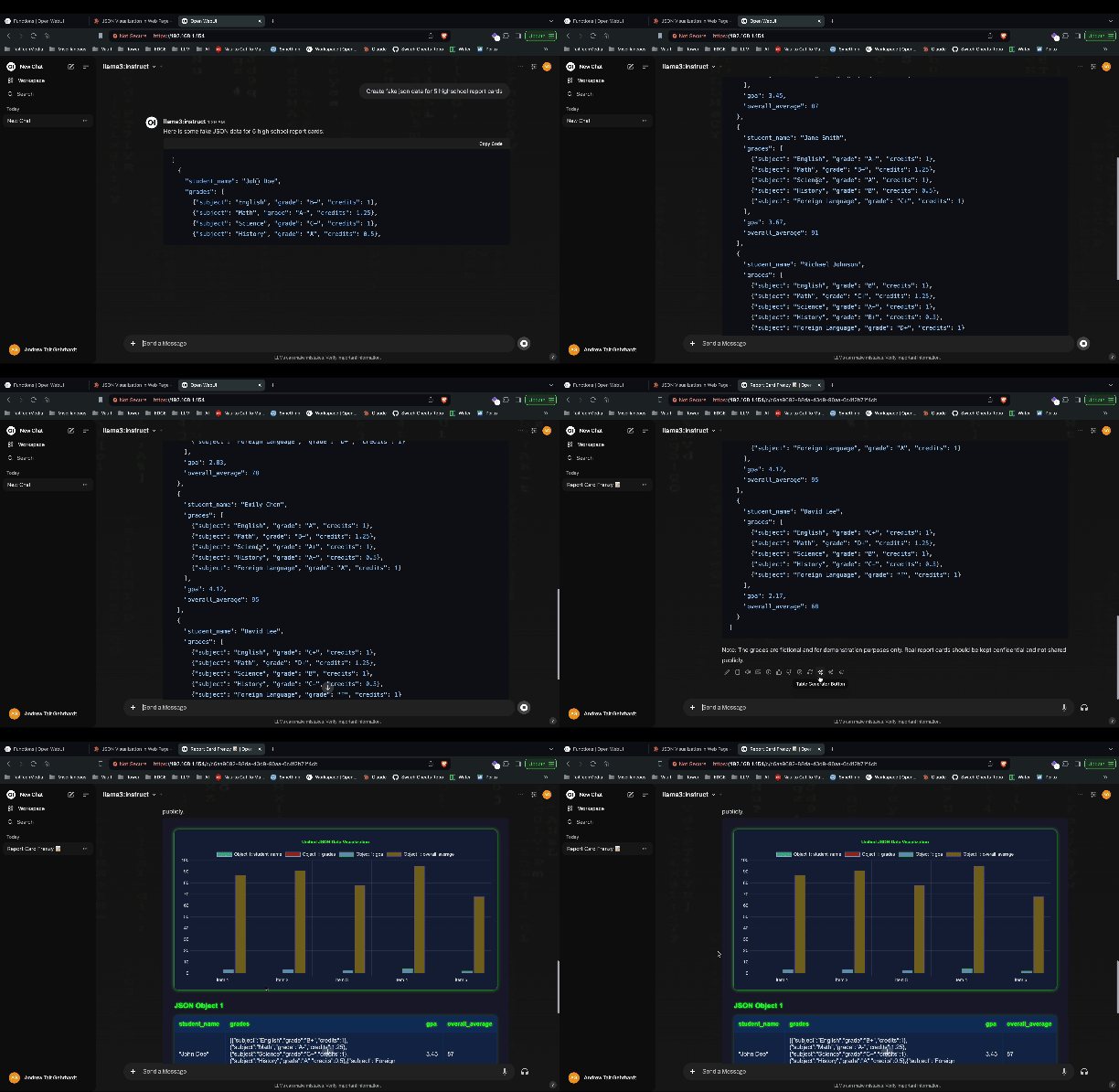
An example of a graph visualization Action can be seen in the video below.
Action Function Architecture
Actions are Python-based functions that integrate directly into the chat message toolbar. They execute server-side and can interact with users through real-time events, modify message content, and access the full Open WebUI context.
Function Structure
Actions follow a specific class structure with an action method as the main entry point:
class Action:
    def __init__(self):
        self.valves = self.Valves()

    class Valves(BaseModel):
        # Configuration parameters
        parameter_name: str = "default_value"
        priority: int = 0  # Controls button display order (lower = appears first)

    async def action(self, body: dict, __user__=None, __event_emitter__=None, __event_call__=None):
        # Action implementation
        return {"messages": [{"id": body["id"], "content": "Modified message content"}]}
Action Method Parameters
The action method receives several parameters that provide access to the execution context:
body: The request the chat sent, withmessages(the conversation so far, each entry carryingid,role,content,timestamp, plusinfoandsourceswhen the message has them),model,chat_id,session_idandid, which is the id of the message the button was pressed on.contentis the message's output text when it has one. No attachments travel with it.__user__: The user record as a plaindict(UserModel.model_dump()), with avalvesentry added when the function definesUserValves__event_emitter__: Function to send real-time updates to the frontend__event_call__: Function for bidirectional communication (confirmations, inputs)__model__: Model information that triggered the action__request__: FastAPI request object for accessing headers, etc.__id__: The function id for a single action. For a sub-action it is only the sub-action id (summarize, notmy_fn.summarize), so sub-action ids must not contain a dot
Return Value
To change what the chat shows, return {"messages": [...]}, where each entry carries the id of an existing message plus the fields to overwrite on it. Anything else is returned to the caller and dropped, so a bare {"content": "..."} silently does nothing. The one exception is an HTMLResponse with Content-Disposition: inline, which becomes a Rich UI embed. Returning nothing at all is fine for actions whose only job is a side effect or an event emitter update.
Event System Integration
Actions can utilize Open WebUI's real-time event system for interactive experiences:
Event Emitter (__event_emitter__)
For more information about Events and Event emitters, see Events and Event Emitters.
Send real-time updates to the frontend during action execution:
async def action(self, body: dict, __event_emitter__=None):
    # Send status updates
    await __event_emitter__({
        "type": "status",
        "data": {"description": "Processing request..."}
    })

    # Send notifications
    await __event_emitter__({
        "type": "notification",
        "data": {"type": "info", "content": "Action completed successfully"}
    })
Event Call (__event_call__)
Request user input or confirmation during execution:
async def action(self, body: dict, __event_call__=None):
    # Request user confirmation
    response = await __event_call__({
        "type": "confirmation",
        "data": {
            "title": "Confirm Action",
            "message": "Are you sure you want to proceed?"
        }
    })

    # Request user input
    user_input = await __event_call__({
        "type": "input",
        "data": {
            "title": "Enter Value",
            "message": "Please provide additional information:",
            "placeholder": "Type your input here..."
        }
    })
When the browser cannot answer, __event_call__ returns a dict with an error key rather than raising: the tab has already disconnected, or WEBSOCKET_EVENT_CALLER_TIMEOUT is set and nobody responded in time. Check for that key before using the result. See Events → Interactive Events.
Action Types and Configurations
Single Actions
Standard actions with one action method:
async def action(self, body: dict, **kwargs):
    # Single action implementation
    return {"messages": [{"id": body["id"], "content": "Action result"}]}
Multi-Actions
Functions can define multiple sub-actions through an actions list. It has to be an attribute of the Action class, either a class attribute or set on self in __init__. A module-level list is never read.
class Action:
    actions = [
        {
            "id": "summarize",
            "name": "Summarize",
            "icon_url": "https://example.com/icons/summarize.svg"
        },
        {
            "id": "translate",
            "name": "Translate",
            "icon_url": "https://example.com/icons/translate.svg"
        }
    ]

    async def action(self, body: dict, __id__=None, **kwargs):
        if __id__ == "summarize":
            # Summarization logic
            return {"messages": [{"id": body["id"], "content": "Summary: ..."}]}
        elif __id__ == "translate":
            # Translation logic
            return {"messages": [{"id": body["id"], "content": "Translation: ..."}]}
A sub-action without a name is shown as <function name> (<sub id>). Its icon is the sub-action's icon_url, then the frontmatter icon_url, then an icon_url or icon attribute on the class, then the default icon.
Global vs Model-Specific Actions
- Global Actions: Turn on the toggle in the Action's settings, to globally enable it for all users and all models.
- Model-Specific Actions: Configure enabled actions for specific models in the model settings.
An action is offered only while it is enabled. A user who is not an admin can run it only on a model they have access to that surfaces the action, and only on a chat they own. Setting ENABLE_PLUGINS or ENABLE_FUNCTIONS to false disables actions altogether.
Button Display Order (Priority)
Action buttons beneath assistant messages are sorted by their priority valve value in ascending order: lower values appear first (leftmost), higher values appear later (rightmost). The default priority is 0.
To control the order, add a priority field to your Action's Valves:
class Valves(BaseModel):
    priority: int = 0  # Lower = appears first in the button row
This uses the same priority mechanism as filter functions, so the behavior is consistent across the plugin system. Without a priority valve, actions default to 0 and their order among equal priorities is determined alphabetically by function ID.
Advanced Capabilities
Long-running Actions
An action runs inline inside the HTTP request the button press sends. There is no task-system hook, so report progress through __event_emitter__ and keep the work within what the client will wait for:
async def action(self, body: dict, __event_emitter__=None):
    # Start long-running process
    await __event_emitter__({
        "type": "status",
        "data": {"description": "Starting background processing..."}
    })

    # Perform time-consuming operation
    result = await some_long_running_function()

    return {"messages": [{"id": body["id"], "content": f"Processing completed: {result}"}]}
File and Media Handling
The payload an action receives carries the conversation's messages, not their attachments, and returning a files list does nothing. To reach a chat's files, use body["chat_id"] with the chat and file APIs, and surface anything you produce through __event_emitter__ or by rewriting the message content.
User Context and Permissions
Actions can access user information and respect permissions:
async def action(self, body: dict, __user__=None):
    if __user__["role"] != "admin":
        return {"messages": [{"id": body["id"], "content": "This action requires admin privileges"}]}

    user_name = __user__["name"]
    return {"messages": [{"id": body["id"], "content": f"Hello {user_name}, admin action completed"}]}
Example: Specifying Action Frontmatter
Each Action function can include a docstring at the top to define metadata for the button. This helps customize the display and behavior of your Action in Open WebUI.
Example of supported frontmatter fields:
title: Display name of the Action.author: Name of the creator.version: Version number of the Action.required_open_webui_version: Minimum compatible version of Open WebUI.icon_url (optional): A URL pointing to an icon image (PNG, SVG, JPEG, etc.). While base64 data URIs are technically supported, using a hosted URL is strongly recommended. See the warning below.
Do not embed base64-encoded images as your icon_url. The icon data for every action is included in the /api/models API response, which is sent to the frontend on every page load for every model that has the action enabled.
Example of the impact: If you use a 500 KB base64 icon for an action, and that action is enabled on 20 models, the API response grows by 20 × 500 KB = ~10 MB, just for that one action. If you have three such actions, that becomes ~30 MB of unnecessary payload. This will:
- Significantly slow down frontend load times for all users
- Increase backend memory usage and network bandwidth on every request
- Degrade the overall user experience, especially on slower connections
Instead, host your icon as a static file (e.g., on your web server, a CDN, or a public URL) and reference it by URL. This keeps the API payload minimal.
Example (Recommended, URL icon):
Example
"""
title: Enhanced Message Processor
author: @admin
version: 1.2.0
required_open_webui_version: 0.5.0
icon_url: https://example.com/icons/message-processor.svg
requirements: requests,beautifulsoup4
"""

from pydantic import BaseModel

class Action:
    def __init__(self):
        self.valves = self.Valves()

    class Valves(BaseModel):
        api_key: str = ""
        processing_mode: str = "standard"

    async def action(
        self,
        body: dict,
        __user__=None,
        __event_emitter__=None,
        __event_call__=None,
    ):
        # Send initial status
        await __event_emitter__({
            "type": "status",
            "data": {"description": "Processing message..."}
        })

        # Get user confirmation
        response = await __event_call__({
            "type": "confirmation",
            "data": {
                "title": "Process Message",
                "message": "Do you want to enhance this message?"
            }
        })

        if not response:
            return None

        # Process the message the button was pressed on
        message = body["messages"][-1]
        enhanced_content = f"Enhanced: {message.get('content', '')}"

        return {"messages": [{"id": body["id"], "content": enhanced_content}]}
Best Practices
Error Handling
Always implement proper error handling in your actions:
async def action(self, body: dict, __event_emitter__=None):
    try:
        # Action logic here
        result = perform_operation()
        return {"messages": [{"id": body["id"], "content": f"Success: {result}"}]}
    except Exception as e:
        await __event_emitter__({
            "type": "notification",
            "data": {"type": "error", "content": f"Action failed: {str(e)}"}
        })
        return {"messages": [{"id": body["id"], "content": "Action encountered an error"}]}
An exception that escapes action() becomes an HTTP 400, a toast in the interface, and an error marker on the message the button was pressed on.
Performance Considerations
- Use async/await for I/O operations
- Implement timeouts for external API calls
- Provide progress updates for long-running operations
- Consider using background tasks for heavy processing
User Experience
- Always provide clear feedback through event emitters
- Use confirmation dialogs for destructive actions
- Include helpful error messages
Integration with Open WebUI Features
Actions integrate seamlessly with other Open WebUI features:
- Models: Actions can be model-specific or global
- Tools: Actions can invoke external tools and APIs
- Files: The action payload carries no attachments. Fetch a chat's files through the file APIs using
body["chat_id"]when an action needs them - Memory: Actions can access conversation history and context
- Permissions: Actions respect user roles and access controls
- Rich UI Embedding: Actions can return HTML content that renders as interactive iframes in the chat
For more examples and community-contributed actions, visit https://openwebui.com/search where you can discover, download, and explore custom functions built by the Open WebUI community.