Retrieval Augmented Generation (RAG)
If you're using Ollama, note that it picks a model's default context length from your GPU's VRAM, and on GPUs with less than 24 GiB that is 4096 tokens (see Ollama's context length documentation). This severely limits Retrieval-Augmented Generation (RAG) performance, especially for web search, because retrieved data may not be used at all or only partially processed.
Retrieval Augmented Generation (RAG) is a technique that enhances the conversational capabilities of chatbots by incorporating context from diverse sources. It works by retrieving relevant information from a wide range of sources such as local and remote documents, web content, and even multimedia sources like YouTube videos. The retrieved text is then combined with a predefined RAG template and prefixed to the user's prompt, providing a more informed and contextually relevant response.
One of the key advantages of RAG is its ability to access and integrate information from a variety of sources, making it an ideal solution for complex conversational scenarios. For instance, when a user asks a question related to a specific document or web page, RAG can retrieve and incorporate the relevant information from that source into the chat response. RAG can also retrieve and incorporate information from multimedia sources like YouTube videos. By analyzing the transcripts or captions of these videos, RAG can extract relevant information and incorporate it into the chat response.
Local and Remote RAG Integration
To use a local document in RAG, upload it from the Documents section in the Workspace area. In a chat, type # before your query and select the uploaded document from the suggestion box that appears above the message input. Once selected, a document icon appears above Send a message, indicating that the document has been attached for retrieval.
Need to clean up multiple uploaded documents or audit your storage? You can now use the centralized File Manager located in Settings > Data Controls > Manage Files. Deleting files there will automatically clean up their corresponding RAG embeddings.
You can also load documents into the workspace area with their access by starting a prompt with #, followed by a URL. This can help incorporate web content directly into your conversations.
External Knowledge Sources (External Vector Databases)
This feature is experimental, and its configuration may change between releases.
Instead of uploading and embedding documents inside Open WebUI, you can point a knowledge base at an external vector database you already maintain. Open WebUI queries it directly at chat time, so your documents, embeddings and indexing stay in your own store and are never re-ingested.
Supported providers: Qdrant, Milvus and pgvector. The provider's Python client must be present in your Open WebUI image (for example qdrant-client or pymilvus).
Adding an external knowledge source
Configure these under Settings > Admin > Integrations > External Knowledge Sources:
-
Create a connection to your vector database:
- Provider (Qdrant / Milvus / pgvector)
- Endpoint (the database URL)
- API Key / Token (if your database requires authentication)
- Database / Table / Collection (depending on the provider)
- Timeout
-
Map the result fields so Open WebUI knows how to read your records. Each setting maps a field in your stored documents to what Open WebUI expects:
Open WebUI field Mapping setting Default field Chunk text Content Field contentTitle Title Field titleSource Source Field sourceURL URL Field urlDocument ID Document ID Field document_idPage Page Field pageExtra metadata Metadata Field metadataRelevance score Score Field scoreDotted paths are supported for nested fields (for example
payload.text). -
Test the query with a sample question. Open WebUI runs a live retrieval against the source and shows the results. A successful test is required before you can create or save the source.
Once created, the external source appears in Workspace > Knowledge like any other knowledge base and can be attached to models or chats. At chat time, Open WebUI embeds the user's query with its configured RAG embedding model, searches the external database by vector, and feeds the top matches into the prompt. No copy of the documents is stored in Open WebUI.
In the sources under an answer, each result is listed by its title. When a result's Source Field holds a web address, clicking its title or the Content link in the citation opens that page; otherwise the title is plain text.
Because Open WebUI embeds the query and searches your database by vector, the vectors stored in your external database must come from the same embedding model Open WebUI uses (matching model and dimensions). Mismatched embeddings produce poor or meaningless results.
Web Search for RAG
Context Length Warning for Ollama Users: Web pages typically contain 4,000-8,000+ tokens even after content extraction, including main content, navigation elements, headers, footers, and metadata. With only 4096 tokens available, you're often getting half the page content, missing the most relevant information. Even 4096 tokens is frequently insufficient for comprehensive web content analysis.
To Fix This: Navigate to Settings > Admin > Models, click the pencil (Edit) on your Ollama model, open Advanced Params and increase the context length to 8192+ (or rather, more than 16000) tokens. This setting specifically applies to Ollama models. For OpenAI and other integrated models, ensure you're using a model with sufficient built-in context length (e.g., GPT-5.6 with a 1M-token context window).
For web content integration, start a query in a chat with #, followed by the target URL. Click on the formatted URL in the box that appears above the chat box. Once selected, a document icon appears above Send a message, indicating successful retrieval. Open WebUI fetches and parses information from the URL if it can. A link to a file, such as a PDF, is read with document extraction. If it cannot read the URL, the attempt fails with a message naming the link that could not be read, see Attaching a link or a YouTube video fails.
Web pages often contain extraneous information such as navigation and footer. For better results, link to a raw or reader-friendly version of the page.
RAG Template Customization
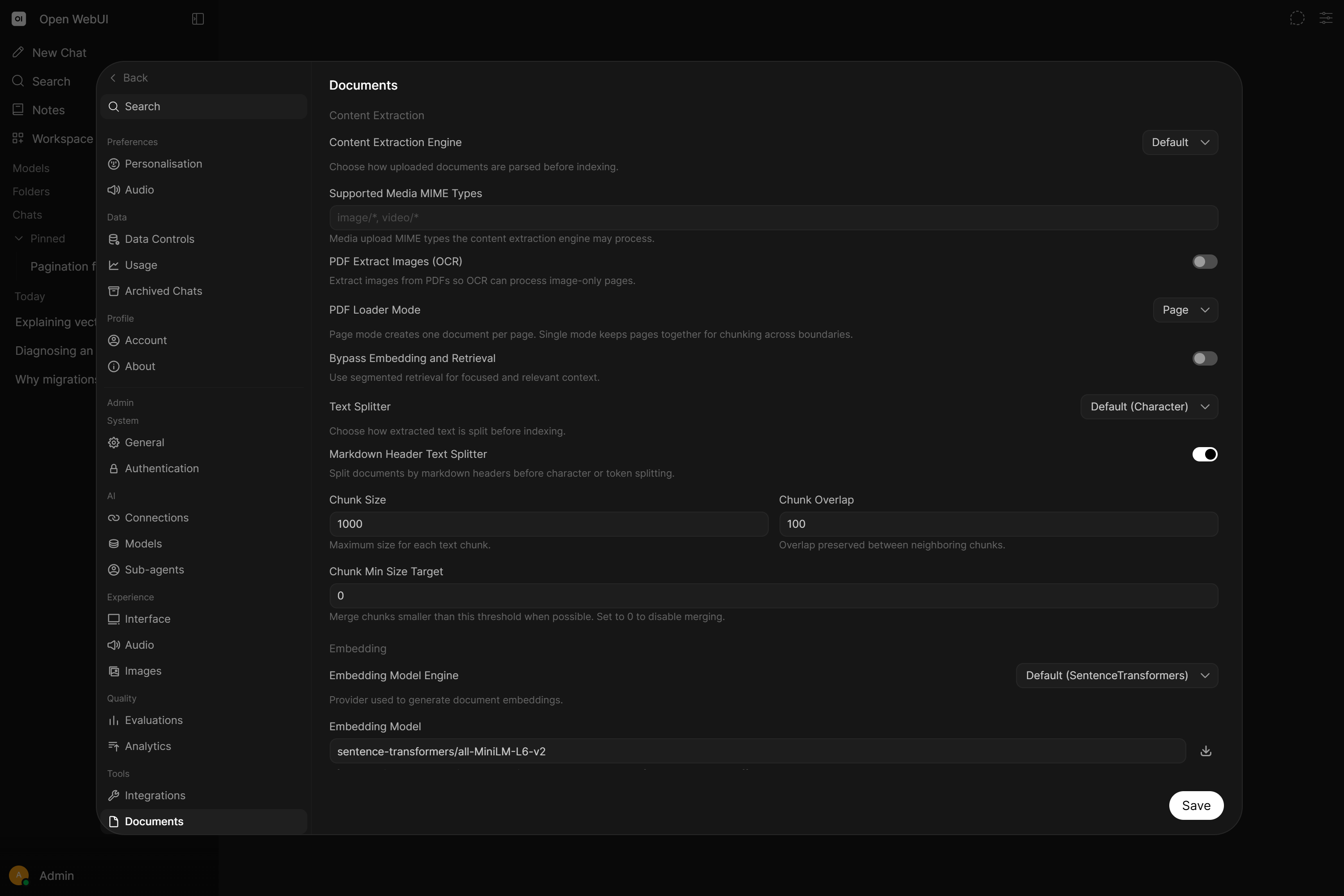
Customize the RAG template from the Settings > Admin > Documents menu.
The RAG template formats the retrieved context and is prefixed to your message before it reaches the model. Use the {{CONTEXT}} placeholder (or the legacy [context]) to mark where the retrieved document context is inserted. That is the placeholder the template exists for, without it, retrieved context has nowhere to go.
Your message (the query) is always appended automatically after the rendered template, so the model already sees it once. The template also recognizes {{QUERY}} / [query] and will substitute the query there, but because the query is still appended afterward, including that placeholder makes the query appear twice in the final prompt. Leave {{QUERY}} / [query] out of your template: it is a wrapper for the retrieved context, not the place to position the query.
Markdown Header Splitting
When enabled, documents are first split by markdown headers (H1-H6). This preserves document structure and ensures that sections under the same header are kept together when possible. The resulting chunks are then further processed by the standard character or token splitter.
Use the Chunk Min Size Target setting (found in Settings > Admin > Documents) to intelligently merge small sections after markdown splitting, improving retrieval coherence and reducing the total number of vectors in your database.
Chunking Configuration
Open WebUI allows you to fine-tune how documents are split into chunks for embedding. This is crucial for optimal retrieval performance.
- Text Splitter: Choose how chunk size is measured.
RAG_TEXT_SPLITTERischaracter(default, RecursiveCharacterTextSplitter),token, ortoken_transformers. Thetokensplitter counts tokens with Tiktoken. Thetoken_transformerssplitter counts them with the HuggingFace tokenizer named byRAG_TOKENIZER_MODEL(e.g.bert-base-uncased), which matches chunk boundaries to your embedding model's own tokenizer. It is unavailable on the slim image. - Chunk Size: Sets the maximum number of characters (or tokens) per chunk.
- Chunk Overlap: Specifies how much content is shared between adjacent chunks to maintain context.
- Chunk Min Size Target: Although Markdown Header Splitting is excellent for preserving structure, it can often create tiny, fragmented chunks (e.g., a standalone sub-header, a table of contents entry, a single-sentence paragraph, or a short list item) that lack enough semantic context for high-quality embedding. You can counteract this by setting the Chunk Min Size Target to intelligently merge these small pieces with their neighbors.
Why use a Chunk Min Size Target?
Intelligently merging small sections after markdown splitting provides several key advantages:
- Improves RAG Quality: Eliminates tiny, meaningless fragments, ensuring better semantic coherence in each retrieve chunk.
- Reduces Vector Database Size: Fewer chunks mean fewer vectors to store, reducing storage costs and memory usage.
- Speeds Up Retrieval & Embedding: A smaller index is faster to search, and fewer chunks require fewer embedding API calls (or less local compute). This significantly accelerates document processing when uploading files to chats or knowledge bases, as there is less data to vectorize.
- Efficiency & Impact: Testing has shown that a well-configured threshold (e.g., 1000 for a chunk size of 2000) can reduce chunk counts by over 90% while improving accuracy, increasing embedding speed, and enhancing overall retrieval quality by maintaining semantic context.
How the merging algorithm works (technical details)
For most users, the explanation above is all you need: small chunks get merged with their neighbors, resulting in better retrieval with fewer vectors and other performance, cost and storage benefits. But if you're curious about the exact logic and design rationale, here's how it works under the hood.
Why header-based splitting needs merging
Markdown header splitting is one of the better structural approaches to chunking because headers are explicit semantic boundaries placed by the document author. You're leveraging human judgment about where one topic ends and another begins, which usually produces more coherent chunks than fixed-size windowing that might cut mid-paragraph or mid-thought.
However, real documents often have structural quirks: tables of contents, short introductory sections, single-sentence paragraphs under their own headers, or deeply nested subheadings with minimal content. These produce tiny chunks that cause problems:
- They lack sufficient context to be useful when retrieved in isolation
- They can produce noisy retrieval results (matching on limited signal but contributing nothing useful)
- Very short texts sometimes embed less reliably
- They waste vector storage and slow down retrieval
- Many chunks take longer to embed than fewer chunks (with the same total content)
- More embedding operations means more API calls (cost) or more local compute
The merging algorithm addresses this by intelligently combining undersized chunks while respecting document structure and size limits.
The algorithm: a single forward pass
The merging logic is deliberately simple, a single forward pass through all chunks:
- Start with the first chunk as the "current" accumulator.
- For each subsequent chunk, check if it can be absorbed into the current chunk.
- A chunk can be absorbed if all three conditions are met:
- The current accumulated content is still below
CHUNK_MIN_SIZE_TARGET - Merging wouldn't exceed
CHUNK_SIZE(the maximum) - Both chunks belong to the same source document
- The current accumulated content is still below
- If absorption is possible, merge them (with
\n\nseparation to preserve visual structure) and continue checking the next chunk. - If absorption isn't possible, finalize the current chunk and start fresh with the next one as the new accumulator.
- Repeat until all chunks are processed.
Key point: The size check is on the accumulated content, not individual chunks. This means multiple consecutive tiny chunks (like a table of contents with many small entries) will keep folding together until the combined size reaches the threshold or until merging the next chunk would exceed the maximum.
Design decisions and why they matter
Forward-only merging: Small chunks always merge into the next chunk, never backward. This keeps the logic simple and predictable, and preserves the natural "this section introduces what follows" relationship common in documents. A brief intro section merging forward into the content it introduces makes semantic sense.
Why not backward merging? Beyond added code complexity, backward merging would frequently fail anyway. By the time any chunk gets finalized, it's in one of two states: either it grew to meet or exceed CHUNK_MIN_SIZE_TARGET through absorption (so it's already "satisfied" with limited headroom), or it couldn't absorb the next chunk because that would exceed CHUNK_SIZE (so it's already bumping against the ceiling). Either way, a backward merge attempt would often fail the size check, meaning you'd add branching logic and state tracking for something that rarely succeeds.
No cross-document merging: Chunks from different source files are never combined, even if both are small. This preserves clear document boundaries for citation, source attribution, and retrieval context.
Respects maximum size: If merging two chunks would exceed CHUNK_SIZE, both are kept separate. Content is never discarded to force a merge.
Metadata inheritance: Merged chunks inherit metadata from the first chunk in the merge sequence. This is consistent with forward-merge semantics: source and header information reflects where the merged section "started," which is typically the right choice for retrieval and citation purposes.
The \n\n separator: When chunks merge, they're joined with double newlines rather than concatenated directly. This preserves visual and structural separation in the combined text, which can matter for both embedding quality and human readability if you inspect your chunks.
Edge cases
Consecutive tiny chunks: Handled naturally. They keep accumulating into a single chunk until the threshold is met or max size would be exceeded.
Small chunk followed by large chunk: If a small chunk is followed by a chunk large enough that merging would exceed CHUNK_SIZE, the small chunk gets finalized as-is, still undersized. This is unavoidable without backward merging or content splitting, but it's also rare in practice. It typically occurs at natural semantic boundaries (a brief transition before a dense section), and the small chunk being standalone at that boundary is arguably correct anyway.
Last chunk in document: If the final chunk is undersized, it stays undersized since there's nothing to merge forward into. Again, unavoidable and usually fine: document endings are natural boundaries.
Performance characteristics
The algorithm is O(n) in the number of chunks: a single pass with no lookahead or backtracking. This makes it fast even for large document collections.
The efficiency gains from merging scale non-linearly in some ways. Retrieval over 45 vectors versus 588 isn't just ~13x faster in raw compute, you're also getting much cleaner top-k results because you've eliminated the noise of near-empty chunks that might score well on partial keyword matches but contribute nothing useful to the LLM. The quality improvement often matters more than the speed improvement.
Testing has shown that a well-configured threshold (e.g., 1000 for a chunk size of 2000) can reduce chunk counts by over 90% while improving retrieval accuracy, because each remaining chunk carries meaningful semantic context rather than being a fragment that confuses both the embedding model and the retrieval ranking. As positive side effects, it also uses less storage space in the vector database and requires fewer embedding operations, which can be a significant cost saving if outsourcing to an embedding service.
RAG Embedding Support
Change the RAG embedding model directly in the Settings > Admin > Documents menu. This feature supports Ollama and OpenAI models, enabling you to enhance document processing according to your requirements.
Changing RAG Settings After Initial Setup
If you need to change your chunking configuration (chunk size, overlap) or embedding model after documents have already been indexed, it is important to understand what actions are required and what effects those changes will have.
Changing Chunk Size and Overlap
New documents will automatically use the updated chunk size and overlap settings. No action is required for newly uploaded files.
Existing documents in knowledge bases retain their original chunking until you run a re-index. Retrieval will still work for these old chunks (vector similarity search does not depend on chunk size), but you may notice inconsistent retrieval quality if old and new documents have very different chunk sizes.
If you are only changing chunk settings and not the embedding model, a re-index is not strictly required. Old documents will continue to work. However, for consistent retrieval quality across all documents, running a re-index is recommended.
Changing the Embedding Model
Changing the embedding model requires a re-index of all knowledge base documents. Embeddings from different models exist in different vector spaces and are not compatible with each other. Without re-indexing, retrieval against old embeddings will produce poor or nonsensical results.
After changing the embedding model in Settings > Admin > Documents, navigate to Settings > Admin > Documents and click the Reindex button to re-embed all knowledge base documents with the new model.
What Does Re-Indexing Do?
The re-index process performs the following steps for each knowledge base:
- Deletes the existing vector collection for the knowledge base.
- Re-chunks every file using the current chunk size, overlap and text splitter settings.
- Re-embeds all chunks using the currently configured embedding model.
- Rebuilds the per-file collection of every file in the knowledge base as well, so attaching one of those files to a chat on its own retrieves the same content as searching the knowledge base it belongs to.
This means a single re-index applies both chunking setting changes and embedding model changes simultaneously.
Re-indexing works from the text that was extracted when the file was first uploaded. The original document is not opened again, so changing the content extraction engine or any other parsing setting has no effect on files that are already in a knowledge base. Re-upload them if you need them parsed again.
The re-index operation only processes files that belong to knowledge bases. Files that were uploaded directly into a chat (without being added to a knowledge base) have their own per-file vector collections that are not touched by re-indexing.
If you change the embedding model, those standalone chat file embeddings will still use the old model and retrieval quality for those files will degrade. The only way to update them is to re-upload the files.
Summary
| Change | New Documents | Knowledge Base Documents (no re-index) | Knowledge Base Documents (after re-index) | Standalone Chat Files |
|---|---|---|---|---|
| Chunk Size / Overlap | ✅ Uses new settings | ⚠️ Old chunks still work, but quality may vary | ✅ Re-chunked with new settings | ⚠️ Old chunks, re-upload to update |
| Embedding Model | ✅ Uses new model | ❌ Old embeddings, incompatible vector space | ✅ Re-embedded with new model | ❌ Old embeddings, re-upload to update |
Citations in RAG Feature
The RAG feature allows users to easily track the context of documents fed to LLMs with added citations for reference points. This ensures transparency and accountability in the use of external sources within your chats. To let the model cite page numbers or other details stored with each chunk, set RAG_SOURCE_METADATA_KEYS.
File Context vs Builtin Tools
Open WebUI provides two separate capabilities that control how files are handled. Understanding the difference is important for configuring models correctly.
File Context Capability
The File Context capability controls whether Open WebUI performs RAG (Retrieval-Augmented Generation) on attached files:
| File Context | Behavior |
|---|---|
| ✅ Enabled (default) | Attached files are processed via RAG. Content is retrieved and injected into the conversation context. |
| ❌ Disabled | File content is never extracted or injected. If Builtin Tools is also enabled, the model still receives a short listing of which files are attached, their names rather than their content, so it can decide to fetch one with a tool. |
When to disable File Context:
- Bypassing RAG entirely: When you don't want Open WebUI to process attached files at all.
- Using Builtin Tools only: If you prefer the model to retrieve content on demand rather than having it pre-injected. Disabling File Context is also what injects the builtin Files tools, which let the model list, search and read the chat's attachments itself.
- Debugging/testing: To isolate whether issues are related to RAG processing.
When File Context is disabled, file content is not automatically extracted or injected. Open WebUI does not forward files to the model's native API. If you disable this, the only way the model can access file content is through builtin tools (if enabled) that query knowledge bases or retrieve attached files on-demand (agentic file processing).
Individual files and knowledge bases can also be set to bypass RAG entirely using the "Using Entire Document" toggle. This injects the full file content into every message regardless of native function calling settings. See Full Context vs Focused Retrieval for details.
To stop choosing per file, set Default Upload Mode in Settings > Interface > File: every file you attach then starts in the mode you picked, and can still be switched individually afterwards.
The File Context toggle only appears when File Upload is enabled for the model.
Builtin Tools Capability
The Builtin Tools capability controls whether the model receives native function-calling tools for autonomous retrieval:
| Builtin Tools | Behavior |
|---|---|
| ✅ Enabled (default) | Unless the model is set to Legacy, it receives tools like query_knowledge_bases, view_knowledge_file, search_chats and others. |
| ❌ Disabled | No builtin tools are injected. The model works only with pre-injected context. |
When to disable Builtin Tools:
- Model doesn't support function calling: Smaller or older models may not handle the
toolsparameter. - Predictable behavior needed: You want the model to work only with what's provided upfront.
Combining the Two Capabilities
These capabilities work independently, giving you fine-grained control, and the rows below describe files and knowledge bases attached inside the chat on a model set to Default or Native function calling.
On Legacy, the Builtin Tools setting has no effect on those attachments. No autonomous retrieval tool is given to the model whatever that setting says, so File Context alone decides the outcome: on, and the content is injected upfront, as in the traditional RAG row; off, and nothing reaches the model at all, as in the no-processing row.
| File Context | Builtin Tools | Result |
|---|---|---|
| ✅ Enabled | ✅ Enabled | Full Agentic Mode: RAG content injected + model can autonomously query knowledge bases |
| ✅ Enabled | ❌ Disabled | Traditional RAG: Content injected upfront, no autonomous retrieval tools |
| ❌ Disabled | ✅ Enabled | Tools-Only Mode: No pre-injected content. The model queries knowledge bases on demand, and the builtin Files tools (list_chat_files, query_chat_files, grep_chat_files, view_file) are injected so it can read and search the chat's own attachments. This combination is also the prompt-caching optimum |
| ❌ Disabled | ❌ Disabled | No File Processing: Attached files are ignored, no content reaches the model |
The table above covers attachments made in the chat. Knowledge attached to a model in the Workspace, and knowledge attached to a folder, follow the Function Calling mode instead:
- Legacy: the knowledge is queued for retrieval and injected upfront, exactly as the table describes, provided File Context is enabled. Turning File Context off removes the retrieval step entirely, so nothing is injected on Legacy either.
- Default and Native: nothing is injected regardless of File Context. The knowledge is offered to the model through the builtin knowledge tools, and the model decides whether to search it.
The consequence is a configuration that silently does nothing. With File Context enabled, Builtin Tools disabled, and Function Calling left on Default, knowledge attached to a model or a folder is never reached: nothing is injected, and the model has no tool to query it. Default is the setting most deployments never change, so this combination is easy to arrive at by accident.
Any one of these resolves it:
- Leave Builtin Tools enabled on that model.
- Set Function Calling to Legacy on that model.
- Attach the knowledge base in the chat rather than on the model or folder.
- Most models: Keep both enabled (defaults) for full functionality.
- Small/local models: Disable Builtin Tools if they don't support function calling.
- On-demand retrieval only: Disable File Context, enable Builtin Tools and set the model to Default or Native function calling, if you want it to decide what to retrieve rather than having everything pre-injected. This does not work on Legacy, which never uses the on-demand tools, so with File Context off nothing would be retrieved at all.
Enhanced RAG Pipeline
The togglable hybrid search sub-feature for our RAG embedding feature enhances RAG functionality via BM25, with re-ranking powered by CrossEncoder, and configurable relevance score thresholds. This provides a more precise and tailored RAG experience for your specific use case.
kb_exec)For an even more capable, agentic experience, set ENABLE_KB_EXEC=True. This gives the model a shell-style interface over your knowledge bases (ls, tree, grep, cat, head/tail, read-by-line, with pipes) that capable models tend to chain more reliably than a fan-out of separate search tools, so they locate the right passage more often. It requires native function calling (it is a native-mode builtin tool) and is off by default; for models set to Legacy it has no effect. We recommend turning it on for capable models. See Filesystem-style access.
YouTube RAG Pipeline
The dedicated RAG pipeline for summarizing YouTube videos via video URLs enables smooth interaction with video transcriptions directly. This innovative feature allows you to incorporate video content into your chats, further enriching your conversation experience.
A video is attached as its transcript, so one with no usable transcript cannot be attached, and the error says which case it is: captions disabled by the uploader, an age restricted or unavailable video, no transcript in the requested languages or a request YouTube blocked because of the address it came from. Set the languages to try with YOUTUBE_LOADER_LANGUAGE, and route blocked requests through a proxy with Settings > Admin > Web Search > Youtube Proxy URL (YOUTUBE_LOADER_PROXY_URL). See Attaching a link or a YouTube video fails.
Document Parsing
A variety of parsers extract content from local and remote documents: built-in engines like Tika, Docling and Mistral OCR, or your own service via the external engine if you need per-file-type routing or custom logic. See Document Extraction for the full list and setup steps.
When using Temporary Chat, document processing is restricted to frontend-only operations to ensure your data stays private and is not stored on the server. Consequently, advanced backend parsing (used for formats like complex DOCX files) is disabled, which may result in raw data being seen instead of parsed text. For full document support, use a standard chat session.
CSV Table Summary
A parsed CSV is its rows and nothing else, so a model asked how many orders a spreadsheet holds answers from whichever rows were retrieved. Setting ENABLE_RAG_CSV_SUMMARY=true (off by default, restart required) puts one line in front of every .csv file naming its row count, its data row count and its column names.
The external, tika and docling extraction engines parse .csv files themselves and get no summary. Only files parsed after you turn the setting on get one, and re-indexing does not add it, so existing CSVs have to be re-uploaded.
Google Drive Integration
When paired with a Google Cloud project that has the Google Picker API and Google Drive API enabled, this feature allows users to directly access their Drive files from the chat interface and upload documents, slides, sheets and more and uploads them as context to your chat. Can be enabled Settings > Admin > Documents menu. Must set GOOGLE_DRIVE_API_KEY and GOOGLE_DRIVE_CLIENT_ID environment variables to use.
Detailed Instructions
- Create an OAuth 2.0 client and configure both the Authorized JavaScript origins & Authorized redirect URI to be the URL (include the port if any) you use to access your Open-WebUI instance.
- Make a note of the Client ID associated with that OAuth client. Use it exactly as Google shows it, in the form
<project number>-....apps.googleusercontent.com. The picker reads the Cloud project number from the leading digits of the Client ID. - Make sure that you enable both Google Drive API and Google Picker API for your project.
- On the OAuth consent screen, set the app to In production, or keep it in Testing and add your users to the test user list.
- Add the
https://www.googleapis.com/auth/drive.filescope. Open WebUI asks only for this scope, which grants access to the files each user picks. Google classes it as non-sensitive, so a self-hosted install needs no restricted-scope verification or security assessment, and users get no "Google hasn't verified this app" warning. - Go to the Google Picker API page, and click on the create credentials button.
- Create an API key and under Application restrictions and choose Websites. Then add your Open-WebUI instance's URL, same as the Authorized JavaScript origins and Authorized redirect URIs settings in the step 1.
- Set up API restrictions on the API Key to only have access to Google Drive API & Google Picker API
- Set up the environment variable,
GOOGLE_DRIVE_CLIENT_IDto the Client ID of the OAuth client from step 2. - Set up the environment variable
GOOGLE_DRIVE_API_KEYto the API Key value setup up in step 7 (NOT the OAuth client secret from step 2). - Set up the
GOOGLE_REDIRECT_URIto my Open-WebUI instance's URL (include the port, if any). - Then relaunch your Open-WebUI instance with those three environment variables.
- After that, make sure Google Drive was enabled under
Settings>Admin>Documents>Google Drive
The picker opens in list view, because the drive.file scope gives it no access to file thumbnails.