Sub-agents
Sub-agents let a model hand a focused piece of work to a second agent that runs in parallel, then use the result to continue. The model decides when to delegate by calling the delegate_task builtin tool; you do not drive it manually.
A sub-agent is a full chat completion of its own. It runs with the same tools, skills and filters as the chat that spawned it, on the current model or one of the sub-agent models set on it, works through the task on its own, and hands back its final answer as the tool result. The work happens in a separate chat that is kept out of your chat list, so the parent conversation stays readable.
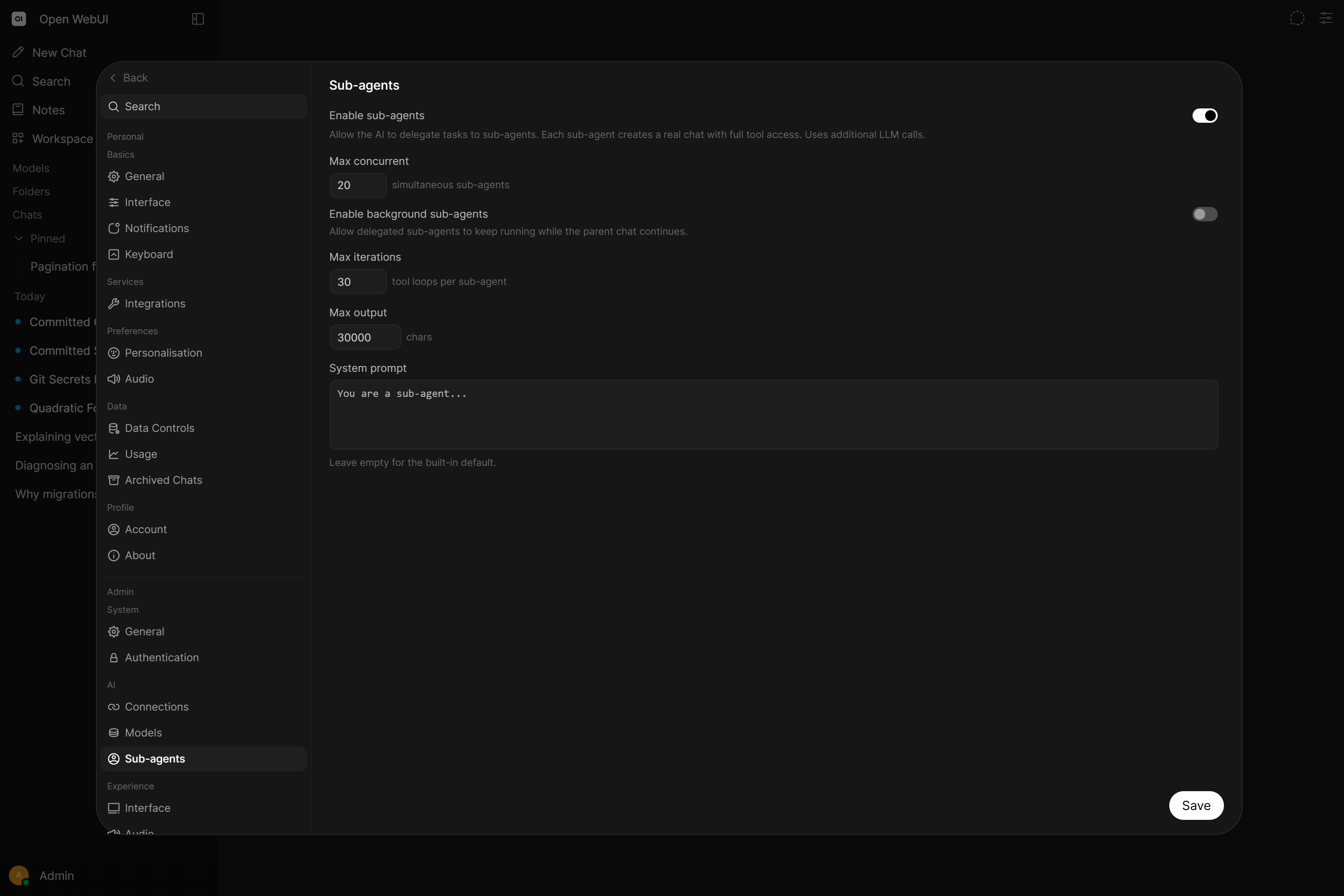
Sub-agents are disabled by default. An administrator enables them with the ENABLE_SUBAGENTS environment variable or the Settings > Admin > Sub-agents toggle. They are off by default because every delegation is an extra model call, and a single reply can start several at once.
What a Sub-agent Is Told
A sub-agent builds its instructions the way a new chat message does, starting from the parent chat's original setup: the chat's own system prompt (from Model controls > Controls or your Settings), the model's system prompt, the chat's variables and the full text of any skills mentioned in the message. The folder's system prompt, tool server and terminal instructions are applied for the sub-agent's own run, along with the sub-agent system prompt.
A background sub-agent's result continues the parent chat with instructions built the same way.
Why Delegate
Delegation buys focus and parallelism:
- A clean context per task. The sub-agent gets the task and only the context handed to it, instead of the whole conversation, so a long chat does not dilute the work.
- Real parallelism. When a model requests several delegations in one reply, they run at the same time rather than one after another.
- A short answer back. Only the sub-agent's final result returns to the parent chat. The intermediate tool calls, searches and dead ends stay in the sub-agent's own chat.
Typical uses are researching several questions at once, working through a task that needs many tool calls, and doing a self-contained job whose intermediate steps do not belong in the main thread.
Foreground and Background
Foreground is the default. The parent chat waits for the sub-agent and receives its answer as the tool result, the same as any other tool call.
Background must be enabled separately with SUBAGENTS_BACKGROUND_ENABLED. The model gets an immediate handle instead of an answer and carries on. When the sub-agent finishes, its result is posted back into the parent chat and the chat continues on its own, without you sending anything. The result appears as a collapsible "Background sub-agent finished" row. If the parent chat is busy at that moment, the result waits and is delivered when the chat is free.
While background is disabled, the background option is stripped from the tool definition entirely, so the model cannot ask for it.
Handing Over Files
A sub-agent starts with no attachments. Nothing the parent chat has uploaded travels with the task on its own, so delegating does not quietly drag every file in a long conversation into a second model call.
To pass a file, the model names it in the file_ids argument of delegate_task. Those files are attached to the sub-agent's opening message the way you would attach them yourself: an image is handed to the model as an image, so a vision model can actually look at it, and a document is available to the sub-agent exactly as it is in a normal chat, retrieved through file context or read with the Files builtin tools when file context is off.
Only files already attached in the parent chat can be passed, and every ID is checked before anything runs. If one of them is unknown or no longer available, the call comes back as Error: file_ids not attached or unavailable: <ids> and no sub-agent is started.
A file ID written into context is only text. The sub-agent receives the ID and no file, so anything it has to open belongs in file_ids.
Enable Sub-agents
Sub-agents need three things to line up:
- Globally enabled:
ENABLE_SUBAGENTS, or Settings > Admin > Sub-agents. - Enabled for the model: the Sub-agents category under Builtin Tools in Workspace > Models > Edit, on by default once the feature is on.
- Native function calling in the UI: builtin tools are only injected for chats started in the interface, and only in Native mode. Legacy function calling and direct API callers never receive
delegate_task.
There is no per-user permission for sub-agents. Once enabled for a model, anyone who can use that model can trigger delegation through it.
Admin Limits
Configure these in Settings > Admin > Sub-agents, or with the matching environment variables:
| Setting | Variable | Default | Purpose |
|---|---|---|---|
| Max concurrent | SUBAGENTS_MAX_CONCURRENT | Empty (unlimited) | Foreground sub-agents at once. Extra ones wait for a slot. |
| Max background | SUBAGENTS_MAX_ASYNC | Empty (unlimited) | Background sub-agents at once. Extra ones are refused immediately. |
| Max iterations | SUBAGENTS_MAX_ITERATIONS | Empty (unlimited) | Tool-call loops one sub-agent may run before it is stopped. The parent then gets the error plus what the sub-agent wrote so far. |
| Max output | SUBAGENTS_MAX_OUTPUT | Empty (unlimited) | Characters returned to the parent. Longer results are truncated. |
| System prompt | SUBAGENTS_SYSTEM_PROMPT | Built-in | Added on top of the model's own system prompt. |
Three limits are worth understanding before changing them:
- They count per worker process, not per deployment. With multiple workers or replicas, the real ceiling is the limit multiplied by the number of processes.
- Max concurrent only takes effect at startup. It is read when the first delegation runs and is not re-read afterwards, so changing it needs a restart. Max background applies immediately.
0is not a way to switch delegation off. A limit is a positive whole number, and empty or0means no limit. UseENABLE_SUBAGENTSto turn the feature off.
What a Sub-agent Cannot Do
Sub-agents are deliberately narrower than the chat that starts them:
- No recursion. A sub-agent cannot delegate again, so delegation cannot fan out without bound.
- No memory writes. It can read memories but cannot add, change or delete them, keeping delegated work from quietly rewriting your personalization.
- No direct connections. Models served through a direct connection cannot delegate.
- No code interpreter in the background, unless the engine is Jupyter, since the browser-based Pyodide engine needs a live session.
- No user tool servers in the background. A foreground sub-agent inherits the tool servers the user added in their own Settings, which run from the browser; a background one does not. Tool servers an admin added (OpenAPI and MCP) stay available to both. If a delegated task depends on a user tool server, keep it in the foreground.
Each sub-agent runs in its own chat. These chats are hidden from chat lists and search, and are deleted together with the parent chat. Admins can read them by id even with ENABLE_ADMIN_CHAT_ACCESS off.
Cost
Every delegation is another full chat completion, with the same tools, and may loop up to the iteration limit. One reply can start several at once, and each background result restarts the parent chat to process it, which is another turn.
No limits are set by default, so only the model decides how many sub-agents run and how long they loop. On a metered API, set the Admin Limits.
What delegation costs shows up in Analytics next to everything else.
Managing Sub-agents from Chat
Available tools
| Tool | Purpose |
|---|---|
delegate_task | Delegate a task to a parallel sub-agent and return its result. |
delegate_task takes the task to perform, optional context to carry across (decisions, file paths, findings), optional file_ids naming attachments the sub-agent has to open (see Handing Over Files), model_id to pick one of the model's sub-agent models, and background when background sub-agents are enabled.
Requirements
ENABLE_SUBAGENTSenabled.- The Sub-agents builtin tools category enabled on the model.
- Native function calling, in a chat started from the interface.
The timer tool is injected by the same category and the same ENABLE_SUBAGENTS toggle. Turning sub-agents off also removes timers.